ARC Procurement · by TEKIA
The easiest way to compare contractor bids.
From budget and comparative through award and cost control — with ARC Copilot and tools built for the Greek construction market.
- Comparatives without Excel
- ARC Copilot
- Greek integrations
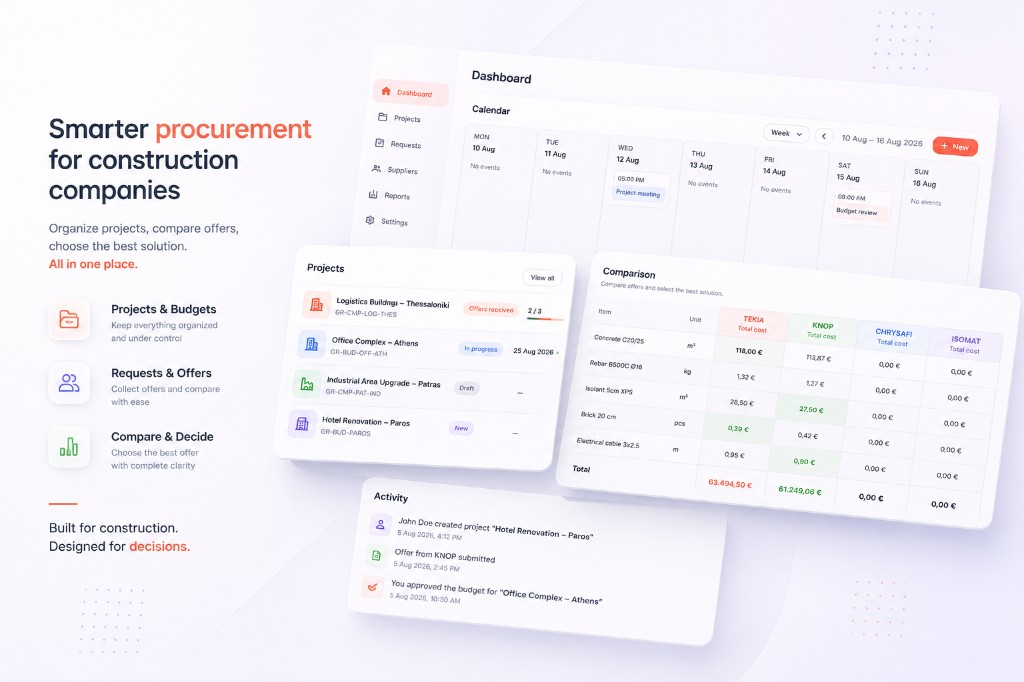
If this is how you work today...
Collecting and comparing bids usually ends up spread across files, emails and phone calls that are hard to track.
Multiple Excel versions
The same tender ends up in different files and it is not always clear which one is the latest.
Constant calls and reminders
You chase bids by email and phone, while progress is tracked manually.
Hard to evaluate bids
Comparison is done by hand and it is difficult to know whether a bid is genuinely competitive.
Everything you need from tender to post-award control.
Comparatives, bids, award, Copilot and Greek workflows — in one place.
Budgets
Build itemised budgets and turn them into a comparative with one click.
Bid comparatives
See every bid side by side and compare prices per contractor and per line item.
Magic links
Contractors open the magic link, fill in their bid and submit it without registering.
ARC Copilot
Ask about projects, comparatives, awards and procurement control — with citations to your data.
Post-award control
Track awarded vs invoiced amounts, unmatched work and on-site delivery receipts.
Greek integrations
GEMI, AADE registry, myDATA, technical-works assistance and 3% withholding file export.
Indicative market prices
Compare bids against indicative construction material prices before you decide.
PDF and Excel exports
Download budgets and finalised comparatives as PDF or Excel for filing and sharing.
How it works
From budget through post-award control.

- 1
Budget
Create or import line items and quantities.
- 2
Comparative
Organise items into a single comparative table.
- 3
Bids
Send magic links and collect contractor offers.
- 4
Award
Compare, select and finalise the award.
- 5
Control
Track myDATA, unmatched work and compliance after award.
Import from Excel
Already have your budget in Excel?
You do not need to re-enter it from scratch.
Upload your existing Excel file, review the data before import and move it into ARC without manual data entry.
- Import many lines at once
- Review the data before the final import
- Correct values before they are committed
- Ready-made Excel templates for clean imports
- Continue the process inside ARC
From Excel to ARC, without starting over from zero.
ARC Copilot
AI that understands your project context.
ARC Copilot organises and analyses your data and helps you check the next steps. It uses comparatives, awards, contractors and procurement-control data to answer questions inside the app.
Copilot suggestions support the decision — they do not replace it.
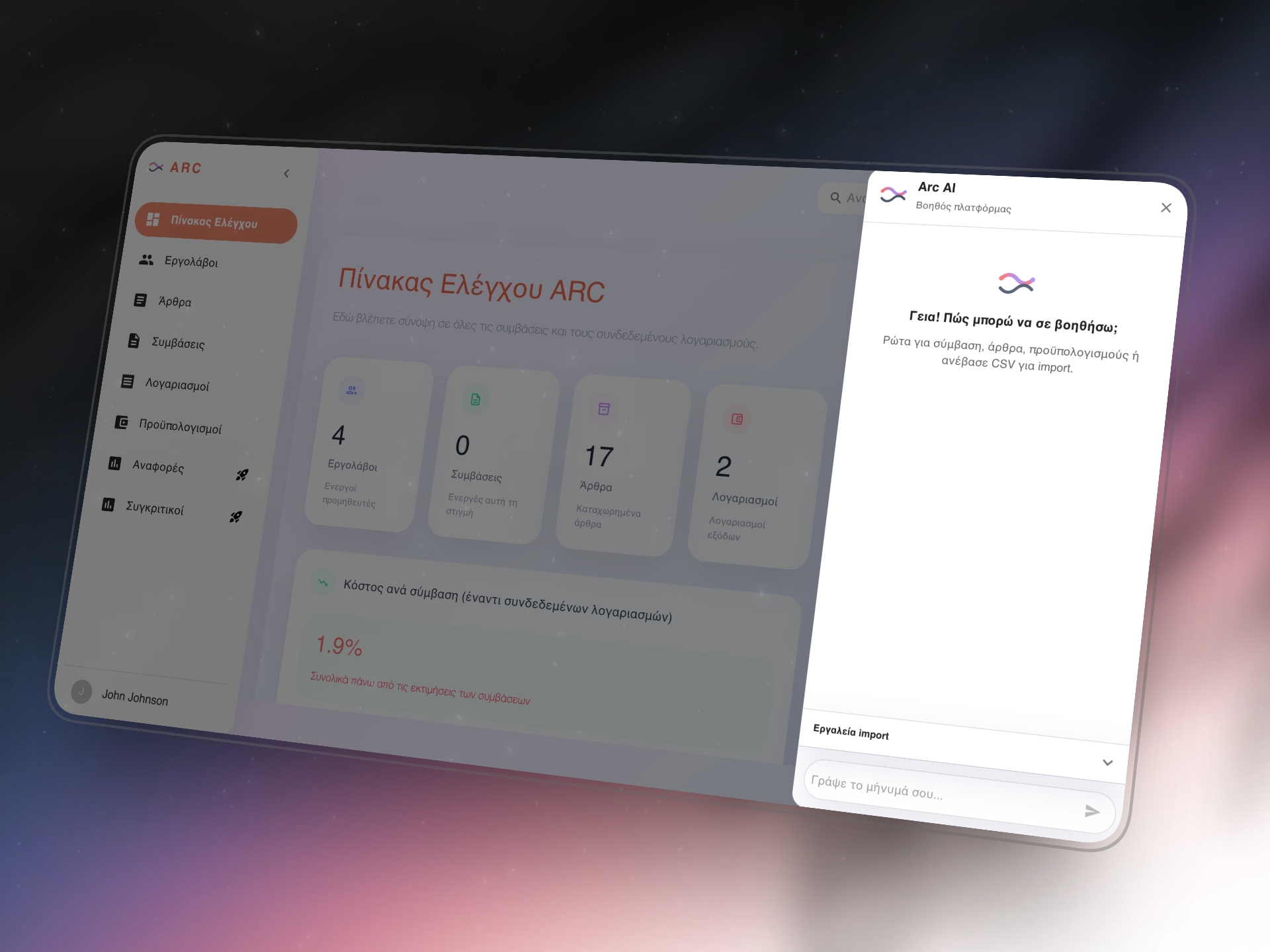
Ask ARC
Ask questions about project data without jumping between screens.
Comparative & award summaries
Get a concise view of a comparative, award or contractor, with citations back to source data.
Procurement control
Ask about unmatched work, compliance and procurement-control status when something needs attention.
After the award
From contractor comparison to post-award control.
After you select a contractor, ARC continues with the award, award package and execution control — so you can see what was awarded and what was invoiced.
Award & award package
Finalise the award and download the award package for filing and sharing.
Procurement control
See awarded amounts, invoiced totals, deliveries and attention items at project level.
Awarded vs invoiced
Compare awarded value with contractor invoices synced from myDATA.
Unmatched work
Find invoices or delivery notes not yet matched to a project and assign them manually.
Built for Greece
Built for the Greek construction market
ARC connects the procurement decision with the follow-on processes Greek construction companies actually run — without re-entering the same details across separate files.
ARC is not an AADE certification and does not replace accounting software. Where no submission API exists, it prepares data and guides you to the official portal.
AADE contractor details
Retrieve available contractor company details through AADE registry services.
GEMI OpenData
Auto-fill available company details via GEMI OpenData.
Awarded vs myDATA
Connect myDATA to compare awarded value with contractor invoices. ARC does not issue invoices.
Technical works above €6,000
Assistance preparing the technical-works declaration with consolidated data. Official filing is completed by you in myAADE.
3% contractor withholding
Generate a 3% contractor withholding file ready for upload to the AADE portal.
ARC + Price
Indicative market prices for construction materials.
Each line can carry an indicative market price, giving you an extra reference point while evaluating bids.
- Indicative price per line
- Confidence level for each hint
- Visual flagging of significant deviations
- Data tailored to construction materials
Prices are indicative and provided for informational purposes only. They do not constitute financial or professional advice.
Bids without registration.
The contractor opens the magic link and submits a bid from phone or desktop, without creating an account.
- Receives the request by email
- Opens the secure link in the browser
- Fills in their prices
- Saves a draft or submits the bid
- Is notified of the outcome once the process is complete
No app installation or new password required.
ARC Procurement, Excel or ERP?
Pick the tool that matches the way you manage bids and contractors.
| Criterion | Excel and email | ERP | ARC Procurement |
|---|---|---|---|
| Comparative organisation | Manual | Usually needs configuration | Purpose-built flow |
| Contractor submission | Email and files | Usually requires an account | Magic link, no registration |
| Bid comparison | Manual | Through a complex flow | Single table |
| AI assistant in procurement | No | Usually needs configuration | ARC Copilot with citations |
| Post-award control | Separate files | Usually needs configuration | Awarded vs myDATA & unmatched |
| Greek tax workflows | Manual preparation | Depends on the implementation | GEMI, AADE, myDATA, exports |
| Indicative market prices | Manual research | Usually not included | Built-in hints |
| Time to start | No software cost | Requires implementation or setup | From €6 / month |
Pricing
Start with a 30-day free trial and pick a plan based on your usage and team size.
Prices exclude VAT. Applicable tax is calculated at checkout where required.
Free trial
€0
for 30 days
- 1 user
- Up to 3 projects
- Up to 3 budgets
- Up to 3 comparatives
- Magic links
- ARC Copilot with monthly usage limits
- Indicative market prices
Starter
€6 / month
excl. VAT
For independent professionals and small companies.
- 1 user
- Up to 3 active projects
- Up to 10 budgets
- Up to 10 comparatives
- Up to 5 contractors per comparative
- Magic links
- ARC Copilot with monthly usage limits
- Indicative market prices
Pro
€19 / month
excl. VAT
For professionals with a higher volume of projects and bids.
- 1 user
- Unlimited projects
- Unlimited budgets
- Unlimited comparatives
- Unlimited contractors and bid requests
- Custom project statuses
- ARC Copilot with monthly usage limits
- Post-award control
- myDATA sync & reconciliation
- 3% withholding file export
Company
€39 / month
excl. VAT
For teams working together on shared projects and comparatives.
- Everything in Pro
- Shared workspace
- Team collaboration
- Roles and permissions
- Approval workflow
- Contractor portal
- Contractor scorecards
Need more than 20 users or a custom commercial agreement? Get in touch with TEKIA. Contact
Ready to move from comparative to post-award control?
Try ARC Procurement free for 30 days, no credit card required.
Frequently asked questions
Do contractors need an account?
No. Contractors receive a secure magic link and submit their bid directly in the browser.
What is ARC Copilot?
It is ARC’s built-in AI assistant. It answers questions about projects, comparatives, awards and procurement control, with citations to your data. It supports the decision — it does not replace it.
Does ARC connect to myDATA?
Yes. You can sync invoices and delivery documents from myDATA and compare awarded value with invoiced amounts. ARC does not issue invoices and does not replace accounting software.
Does ARC submit declarations to AADE?
Not for technical-works declarations or 3% withholding. ARC consolidates the data and, where applicable, generates a file ready for upload; you complete the official submission on the AADE portal. For delivery notes, ARC can confirm or reject a full receipt through the available API.
What are indicative market prices?
They are informational price hints for selected construction materials. They are an extra reference point, not a binding commercial offer.
How does the free trial work?
You get access to ARC Procurement for 30 days with no credit card required. After the trial ends, choose one of the available plans to continue.
Does ARC Procurement replace an ERP?
Not necessarily. ARC is a focused tool for budgets, comparatives, bids, award and post-award control. It can run on its own or alongside your other systems.
Can I import an existing Excel file?
Yes. Upload an existing Excel file, review and correct the data before final import, then continue the process inside ARC.
How do I get started?
Create an account, add your first project and create your first budget or comparative.
Want to see ARC in action?
Book a short walkthrough with the TEKIA team and see the core product flow.
The walkthrough covers
- Creating a budget and comparative
- Sending a magic link to a contractor
- Bid submission, comparison and award
- Post-award control and Greek integrations