ARC Tenders · SaaS by TEKIA
Once a tender matters to you, we keep watching.
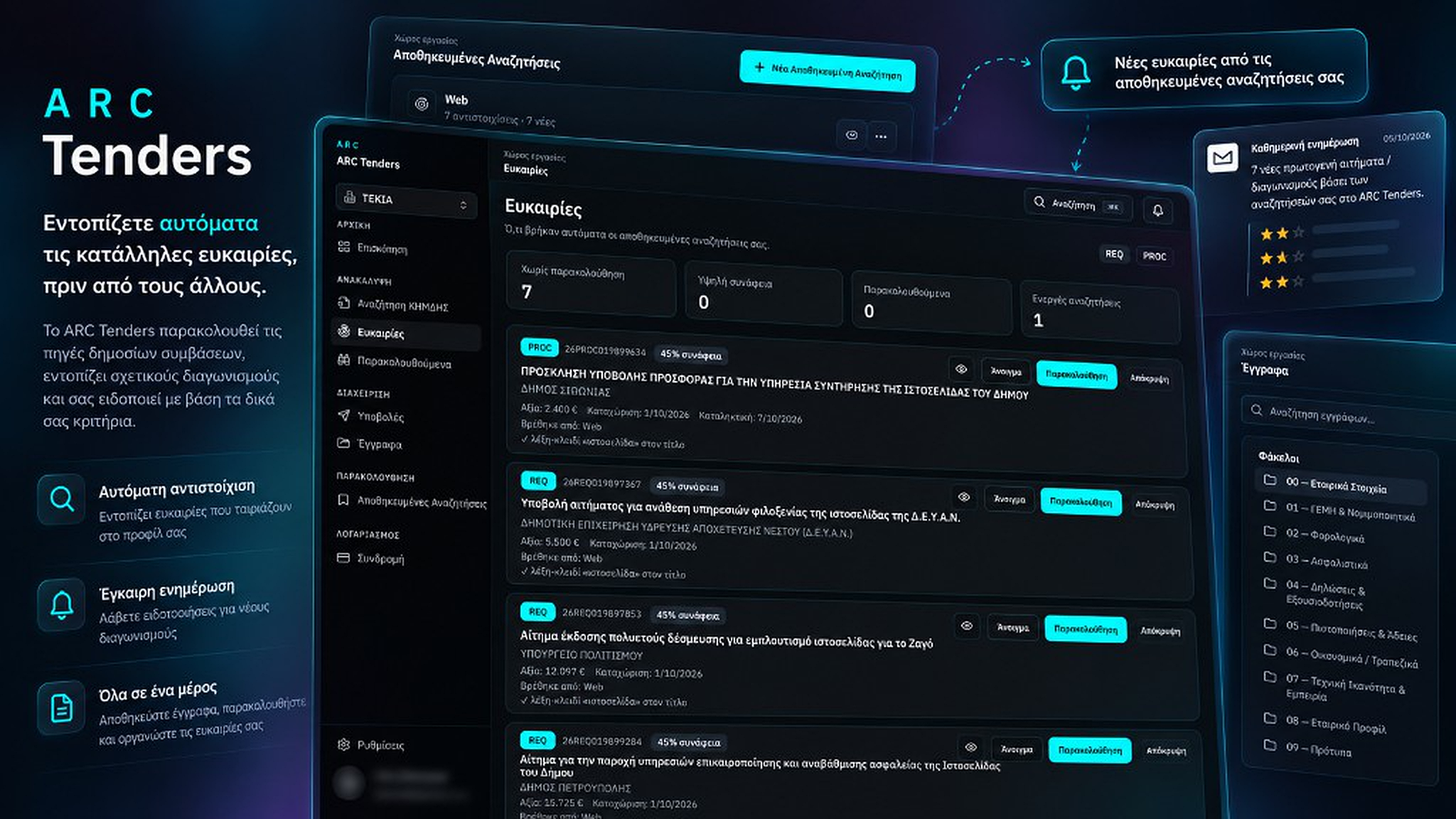
ARC Tenders finds opportunities that fit your company, explains why they matched, and — once you follow — keeps checking ΚΗΜΔΗΣ for invitations, developments and awards. You record outreach and submission; it never emails an awarding authority for you.
- Continuous ΚΗΜΔΗΣ monitoring
- REQ → invitation → award
- Email notifications
Sign up yourself. Following, Expression of Interest and Submission are three different steps. No automatic authority email. No ΕΣΗΔΗΣ filing.
If this is how you chase tenders today...
ΚΗΜΔΗΣ exists, but the work is fragmented: search again, remember who you contacted, check for the invitation, dig through files, miss the award.
You search again and again
Someone has to remember the right CPVs and keywords and open ΚΗΜΔΗΣ every day.
Early interest gets lost
You send an expression of interest on a REQ — then miss the related PROC weeks later.
Documents and actions scatter
Company files, outreach notes and submissions live in email threads and shared folders.
From discovery to award — with continuous monitoring.
Discover, follow, prepare and record. The platform does not stop watching after outreach or submission.
ΚΗΜΔΗΣ search
Search primary requests and notices with real filters and open PDFs inside ARC Tenders.
Saved Searches
Define what you care about once. Opportunities arrive automatically from those rules.
Match explanations
Every Opportunity shows a score and why it matched — keywords, CPVs and your criteria.
Follow & keep watching
Click Follow and the platform keeps that tender on radar — after outreach or submission — until the thread ends or you stop monitoring.
REQ → invitation
Recorded Expression of Interest on a primary request? We keep watching for the related official invitation.
Outreach ≠ Submission
Early interest and formal offer are separate records. One never becomes the other automatically.
After you submit
Record the external submission and we keep watching for awards or other acts — without claiming you won.
Company Vault
Upload company documents once, version them, and reuse them across tenders.
Notifications
New developments show in-app and can reach email — the in-app event stays even if mail is missed.
How it works
Discover → Follow → Prepare → Submit → Keep monitoring the result.
1
Discover
Search ΚΗΜΔΗΣ or let Saved Searches surface Opportunities with scores and reasons.
2
Follow
Mark what matters. From then on we watch ΚΗΜΔΗΣ for related publications.
3
Prepare & submit
Record outreach, prepare the package, submit outside, then record it here.
4
Keep monitoring after submit
It does not end there. We watch for awards and other acts and notify you — you confirm won or lost when needed.
Relevance
You define the search. We explain the match.
ARC Tenders does not dump every new ΑΔΑΜ into your inbox. Opportunities come from your active Saved Searches.
Each match shows a score and human-readable reasons — which keywords and CPVs hit, and which profile found it.
- Saved Searches with keywords, CPVs, amounts and record types
- Strict, Balanced or Broad matching modes
- One Opportunity per tender — even if multiple searches match
- Highest score shown, all matching profiles listed
- No AI classification and no OCR as a product feature
If a screen cannot explain why an Opportunity appeared, it failed the product.
Notifications
In-app attention first. Email when you want it.
The system of record is the in-app Attention Event — not an email that may bounce.
New Opportunity, new invitation on a followed tender, or a new award after submission: it shows in the app. Email delivery is yours to configure.
- In-app bell and notification history
- Email for new Opportunities and followed-thread updates
- Alerts when a REQ gets a PROC — and after submission
- Monitoring stops only when the thread ends or you stop it
A failed email never deletes the event.
Preparation
Prepare the package. Do not auto-send it.
When you start preparation, ARC Tenders creates a tender workspace and a clear next action.
Expression of Interest is not a Submission. Following does not mean you sent anything. Three distinct steps.
- Follow = you care; we monitor related acts
- Outreach = you recorded early interest contact
- Submission = formal offer filed outside, recorded here
- Reuse Company Vault documents without re-upload
- After submission we keep watching ΚΗΜΔΗΣ
SUBMITTED exists only after a recorded submission.
Company Vault
Upload once. Reuse everywhere.
The Company Vault is your organisation’s reusable document source of truth — not a personal Drive folder glued on the side.
Store company documents with versions and expiry. Pick them again for Outreach, preparation and submission snapshots.
- Folders for legal, tax, insurance, certifications and templates
- PDF and DOCX with version history
- Expiry states: valid, expiring soon, expired
- Exact versions preserved on recorded submissions
- One document picker reused across the product
Documents live in application-managed storage — not Google Drive as mandatory infrastructure.
Hard boundary
The product never sends the offer for you.
ARC Tenders discovers, explains, monitors and organises. It cannot email a contracting authority or submit to ΕΣΗΔΗΣ.
That is intentional. Official outreach and filing stay human decisions — and your ledger records what you did.
- No automatic authority email
- No automatic offer or portal submission
- Outreach and Submission are records you create
- Approve / prepare never transmits anything
Detection is automated. Sending is not.
Greek public procurement
Built around ΚΗΜΔΗΣ — for teams that pursue public work.
ARC Tenders reads official ΚΗΜΔΗΣ data for requests and notices, opens public pages by ΑΔΑΜ, and keeps one coherent procurement thread.
ARC Tenders does not replace ΕΣΗΔΗΣ and does not file for you. It organises what your organisation decides to pursue.
Primary requests (REQ)
Catch the early signal, follow it, record interest if you contacted — and do not miss the invitation.
Notices (PROC)
Official invitations link back to the request you already follow — then we keep watching for awards.
ΑΔΑΜ as the key
Every opportunity, alert and recorded action keys to the unique reference.
PDF preview
Open official PDFs inside ARC Tenders without losing your search context.
ΕΣΗΔΗΣ as a channel
A submission method you record — not an integration that files the offer.
Greek team UI
Ευκαιρίες, παρακολουθούμενα, εκδήλωση ενδιαφέροντος and the next-action language your team uses.
ARC Tenders, ΚΗΜΔΗΣ by hand, or a clipping inbox?
Choose the setup that matches how your team actually wins public work.
| Criterion | Manual ΚΗΜΔΗΣ | Alert inbox + Excel | ARC Tenders SaaS |
|---|---|---|---|
| Discovery | Whenever someone remembers | Daily CPV dump | Search + Saved Searches |
| Why it matched | Gut feel | Usually none | Score + match reasons |
| Follow-through | Memory and chats | Stops at the inbox | Monitoring until the thread ends |
| After submission | Manual re-check | Usually nothing | Watch awards and related acts |
| Documents | Loose files | Shared-folder chaos | Company Vault + workspace |
| Sending | Personal inbox / ΕΣΗΔΗΣ | Untracked | Human-recorded, never auto-sent |
| Team workspace | None | Shared mailbox | Multi-tenant organisation |
Want continuous tender monitoring — not another inbox?
Create an account, follow a tender, and see how we keep watching ΚΗΜΔΗΣ through to the result.
Frequently asked questions
Does ARC Tenders submit offers to ΕΣΗΔΗΣ?
No. It never files an offer or emails an awarding authority. Your team prepares, submits through the official channel, and records the submission in ARC Tenders.
What sources does it use?
Official ΚΗΜΔΗΣ data for primary requests (REQ) and notices (PROC), with in-app PDF preview and procurement-thread monitoring.
How does relevance work?
You create Saved Searches with keywords, CPVs and other criteria. Matching Opportunities show a score and clear reasons. There is no AI classifier as a product feature.
Will I get duplicate emails for the same tender?
No. Attention Events are deduplicated. One Opportunity per tender, even when several Saved Searches match.
Where do company documents live?
In the Company Vault inside ARC Tenders — versioned, reusable and snapshotted on submissions. Google Drive is not required.
Does monitoring stop after I submit?
No. After you record a submission we keep watching for awards or other developments. It stops when the thread ends or you stop monitoring. We never auto-claim you won — you confirm that.
Can I use it on my own?
Yes. You create an account yourself, like any SaaS app, and set up your company inside the product.
Is Following the same as Expression of Interest?
No. Following means you care and we monitor developments. Expression of Interest is when you contacted and recorded it. Submission is the formal offer — a third step.
How do I get started?
Go to arc-tenders.tekia.gr, create an account, add your company and make your first Saved Search. Prefer a walkthrough first? We can do that too.
Want a walkthrough first?
If you would rather see it with us before you start, tell us a bit about your team.
The walkthrough covers
- How Saved Searches create Opportunities with scores
- Follow, Outreach and REQ → PROC monitoring
- Company Vault, workspaces and recorded Submission
- In-app attention events and email notification settings